
Twin guide rods
The two rods must enter matching holes in the router base and guide assembly; their parallel spacing resists yaw during a cut.
Hold a router at a controlled offset from an edge for straight, repeatable cuts.
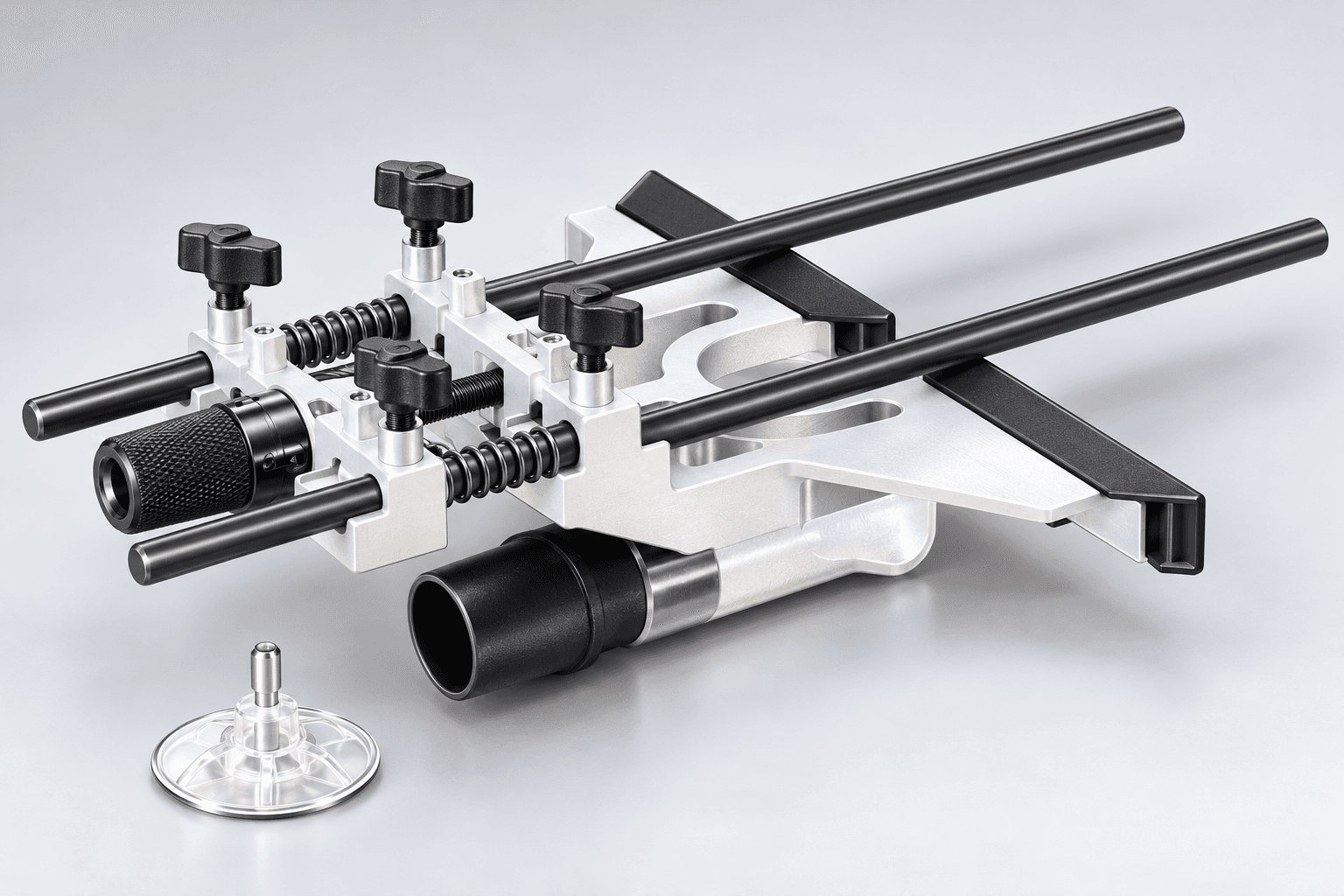
An original educational poster identifies 9 documented construction features. The numbered descriptions remain readable below the artwork on narrow screens.
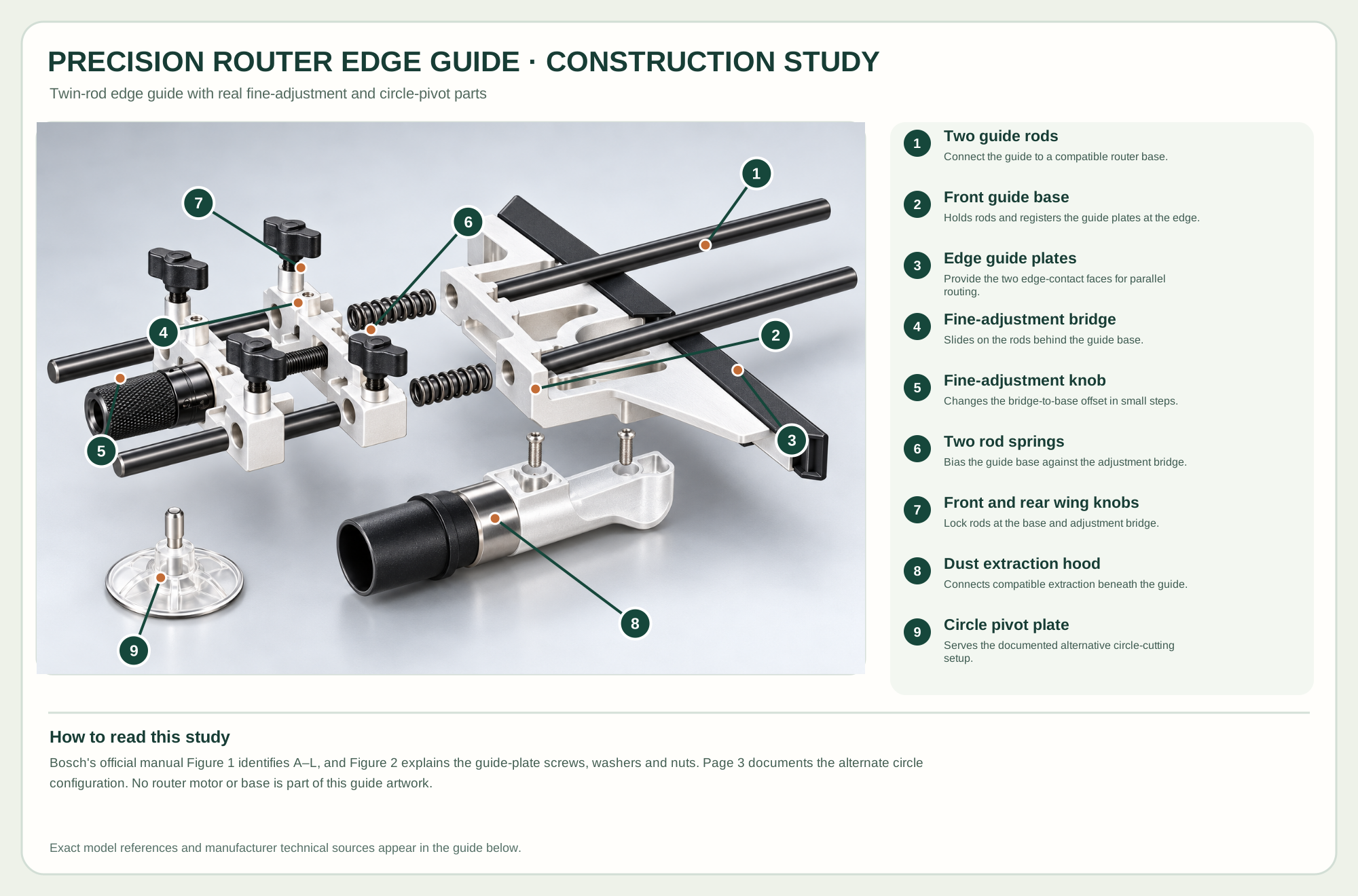
Connect the guide to a compatible router base.
Holds rods and registers the guide plates at the edge.
Provide the two edge-contact faces for parallel routing.
Slides on the rods behind the guide base.
Changes the bridge-to-base offset in small steps.
Bias the guide base against the adjustment bridge.
Lock rods at the base and adjustment bridge.
Connects compatible extraction beneath the guide.
Serves the documented alternative circle-cutting setup.
Technical references: Bosch RA1054 official product · Bosch RA1054 official instruction manual. Only the RA1054 guide is depicted. Two rods pass through the front guide base and the fine-adjustment bridge; springs occupy the rod span between them. The guide plates fasten to the front base. For circle work, the maker reverses the fine-adjustment guide and uses the supplied pivot plate. Original educational artwork depicts documented component groups and their relationships; it is not a service sequence or a replacement for the exact model manual.
The Bosch RA1054 Deluxe Router Guide is a separate accessory for listed Bosch router families. It uses two steel rods, a front guide base with paired edge plates, a spring-biased fine-adjustment guide, four wing knobs and a central adjustment screw. An included pivot plate converts the rod assembly for circles and arcs; the router itself is not part of the guide. The original TWG hero omits branding but keeps the maker's identifiable hardware and the distinct router-versus-guide boundary.
Both rods enter the guide base and a compatible router base. Two springs occupy the span between the guide base and the fine-adjustment bridge. Turning the screw changes the guide's edge offset while the appropriate knobs control sliding and lock the setting. The plates ride against a straight work edge; a dust hood can connect compatible extraction. The maker's manual expressly describes separate assembly of rods, plates, springs, bridge, knobs and pivot accessory, so the construction study follows those physical connections rather than inventing router internals.
The two rods must enter matching holes in the router base and guide assembly; their parallel spacing resists yaw during a cut.
Paired guide plates attach with screws, washers and nuts, forming the edge registration surface.
The sliding rear bridge, central screw, indicator and spacer provide controlled changes in offset while the paired springs maintain contact.
Front and rear wing knobs secure rods and bridge positions. Release only those required by the manual for an adjustment.
A removable hood and hose adapter aid extraction. The separate pivot plate is for the reconfigured circle setup, not an edge-contact foot.
These decisions make the mechanism useful at the bench.
Verify model and rod-hole compatibility. Disconnect the router and install both rods to the minimum insertion described by Bosch.
Set the guide plates against a straight edge and support the router base over the work before cutting.
Loosen the specified knobs, turn the fine-adjustment screw, measure the bit-to-edge offset and lock the assembly.
Use a straight bit and the fence to cut a consistent groove parallel to a board edge in multiple safe passes.
Use a suitable bit and stable plate contact to set a repeated inset or shoulder.
Reconfigure the bridge 180 degrees and install the supplied pivot plate exactly as shown in Bosch's circle-guide instructions.
Use the steps for a first pass, then inspect the work before changing the setup.
The RA1054 does not include a router motor or cutting bit; the compatible router base supplies the rod sockets.
One loose rod can let the guide yaw. Insert both through the intended base holes and tighten evenly.
Circle cutting requires the guide bridge to be reversed and the pivot point fixed; it is not simply a loose disk near an edge fence.
The two plates register on a straight board edge while the router follows the rods.
The bridge is turned around on the rods and the pivot plate controls the center point.
The included hood and hose adapter should be used only with compatible connections and adequate clearance.
Stop the tool and disconnect power before investigating a fault or changing a part.
Check both rod locks, edge-plate fasteners, straightness of the work edge and router support.
Clean the rods and springs; release only the maker-specified knobs and inspect fine-screw alignment.
Check bridge orientation, pivot seating, center mark and rod insertion per Bosch's circle setup.
Use the exact tool manual for setup, limits and replacement parts. These lessons, documents and model pages teach relevant techniques or help compare real variations.
These maker-owned links document relevant tools and tool brands. A product brand may use another company's factory; compare the exact model before choosing parts or accessories.
Cutters, abrasives, guards, guides, dust fittings and service parts vary by tool. Check the model plate and manufacturer manual before ordering or changing a component.
Compare the Routing family →Continue through the Tools library